
Introduction: Stop Guessing Your Project Costs
Whether you are a freelance designer, a construction contractor, or a growing digital agency, accurate pricing is the lifeblood of your business. If you quote too high, you risk losing the client to a competitor. If you quote too low, you win the job but sacrifice your profit margin—or worse, end up paying out of pocket.
Despite the importance of accurate pricing, many business owners still rely on manual Excel spreadsheets or rough "guesstimates" to build their project budgets. This manual process is not only incredibly slow, but it also leaves room for costly mathematical errors.
If you are searching for a better, faster way to price your services, you need a reliable free online cost estimator.
In this comprehensive guide, we will explore why digital estimators are essential for business growth, how to use the Autoquote Online Cost Estimator, and how you can magically turn those quick estimates into legally binding quotations with a single click.
Why You Need a Dedicated Online Cost Estimator
Relying on mental math or outdated spreadsheet templates actively harms your sales pipeline. Adopting an online cost estimator provides three massive advantages for your business:
1. Lightning-Fast Response Times
When a prospect asks, "Roughly how much will this cost?", they expect a fast answer. If you take 48 hours to build a custom spreadsheet, the prospect's buying temperature drops. An online estimator allows you to plug in variables and give them an accurate ballpark figure in under 60 seconds.
2. Guaranteed Profit Margins
A good estimator forces you to account for all variables. By breaking your project down into labor costs, raw materials, third-party software expenses, and a fixed markup percentage, you guarantee that every project you take on remains profitable.
3. Professional Transparency
Clients trust businesses that can explain their pricing. When you use a structured estimator, you can clearly articulate exactly what the client is paying for, building trust and eliminating price objections before they happen.
How to Use the Autoquote Free Online Cost Estimator
To help service providers and small businesses streamline their sales process, we built a highly intuitive, completely free online cost estimator.
There is no software to download, no paywall to unlock, and no credit card required. Here is how you can use it to price your next project:
Step 1: Open the Estimator Tool
Navigate directly to autoquote.digital/#estimator in your web browser.
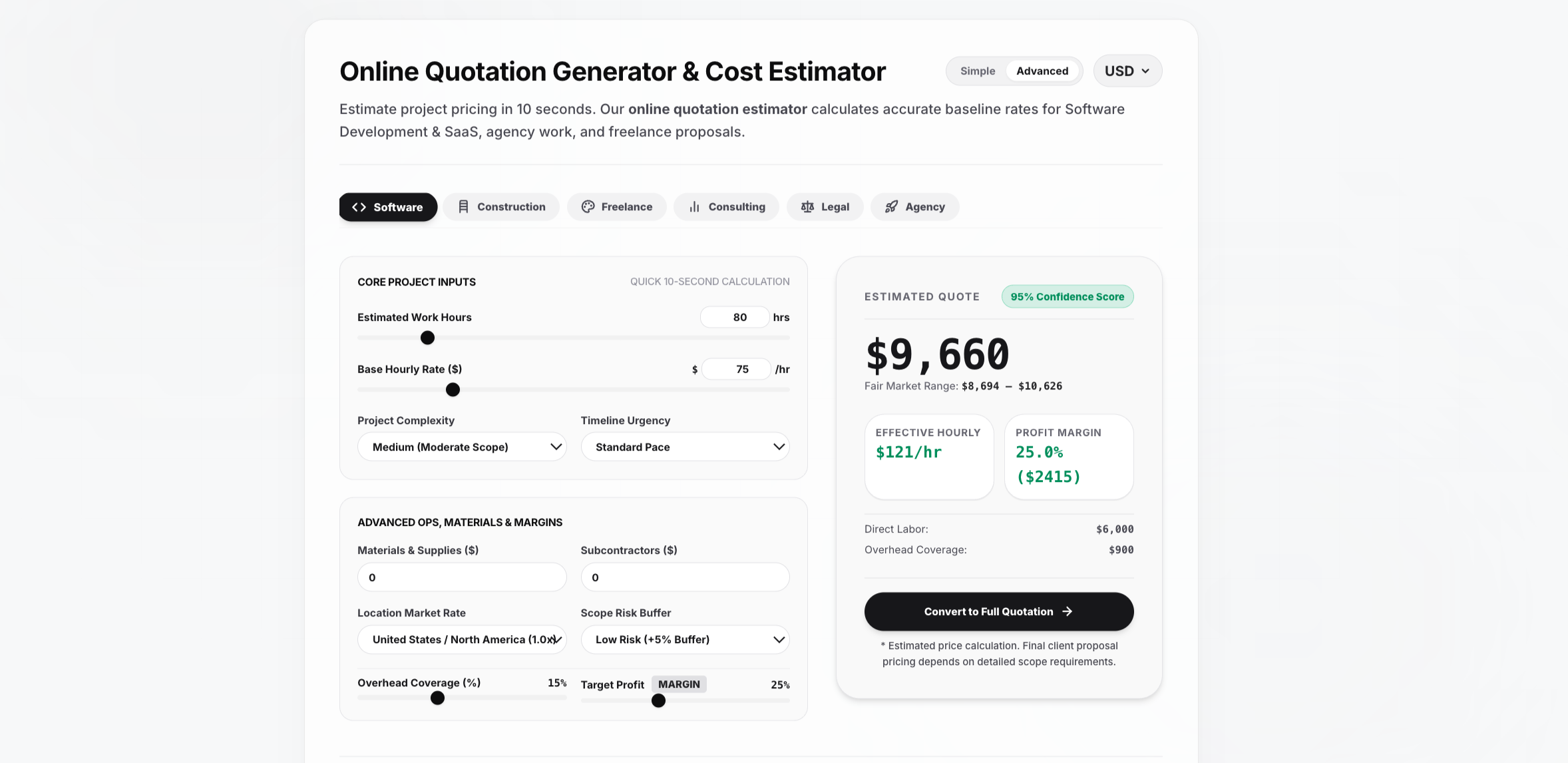
Step 2: Input Your Project Variables
The interface is designed for simplicity. Enter your core project details:
- Labor & Hourly Rates: How many hours will this take, and what is your base rate?
- Material & Overhead Costs: Add any fixed expenses, premium software plugins, or physical materials required for the job.
- Profit Markup: Input your desired profit margin (e.g., 20% or 30%).
Step 3: Instantly Review Your Budget
As you type, the estimator calculates the math in real-time. It instantly factors in your markup, calculates applicable taxes, and outputs a clean, itemized breakdown of your total project cost.
The Ultimate Feature: Convert Your Estimate Into a Quotation
A free online cost estimator is great for doing math, but it doesn't give you a document you can actually send to a client for approval. Usually, you are stuck manually copying and pasting those estimated numbers into a separate Word document or Canva template.
Autoquote changes the game by bridging the gap between estimation and invoicing.
Once you have calculated your perfect project budget using the estimator, you don't have to start from scratch. With Autoquote, you can turn that estimate into an official quote instantly:
- Calculate your final price in the Online Cost Estimator.
- Click the "Generate Quotation" button.
- The software automatically maps your calculated line items, totals, and taxes directly into a beautifully formatted, professional quotation template.
Export to Any Format You Need
Once your quotation is generated, you have total control over how you share it. Autoquote allows you to instantly download or export your new quotation into:
- PDF: For a secure, polished presentation that clients can easily view on mobile.
- Docx (Microsoft Word): If you need to add custom legal clauses or collaborative text edits.
- Excel or Google Sheets: Perfect for corporate clients whose procurement departments require raw spreadsheet data.
100% Free. No Limits. No Catch.
Many software companies advertise a "free cost estimator," only to blur out the final total until you pay for a premium subscription.
Autoquote is different. We believe that generating accurate estimates and basic quotes should be accessible to everyone. Our estimator tool is completely free to use, forever. You can calculate unlimited project budgets and generate unlimited standard quotations without ever hitting a paywall.
(Note: If you want to put your sales entirely on autopilot, we also offer an ultra-affordable Gold Plan that uses AI to write your proposals for you—but the core estimator and manual quote generator will always be free).
Conclusion: Upgrade Your Sales Workflow Today
Accurate cost estimation is the foundation of a successful, scalable business. By ditching manual spreadsheets and adopting a seamless digital workflow, you save unbillable hours, protect your profit margins, and present a highly professional image to your clients.
Ready to stop guessing and start closing?
👉 Click here to use the Free Autoquote Online Cost Estimator and generate your next winning quotation in seconds!